
Quick save · key takeaways
- Bazzite is built on Fedora Atomic Desktops through the Universal Blue project.
- Bazzite 45 follows Fedora Linux 45 and reached stable in November 2026.
- The image model makes updates atomic and every previous build a reboot away.
- Bazzite adds its own kernel, Steam and Game Mode, handheld support and tools.
Ask ten Linux users what Bazzite is based on and you will hear "Fedora", "SteamOS", "Universal Blue" and occasionally "Arch". Only some of those answers are right, and the correct one explains almost everything about how Bazzite behaves: how it updates, why some commands you find online do not work on it, and why it recovers so cleanly from a bad update. This guide walks through the layers underneath Bazzite from the bottom up, so you know exactly what you are installing and why it was put together this way.
The short answer: Bazzite is based on Fedora Atomic Desktops, built through the Universal Blue project. Fedora supplies the packages and the image-based system technology. Universal Blue supplies a shared base image with codecs, drivers and build tooling. Bazzite adds the gaming layer on top. The current release line, Bazzite 45, follows Fedora Linux 45, which arrived at the end of October 2026.
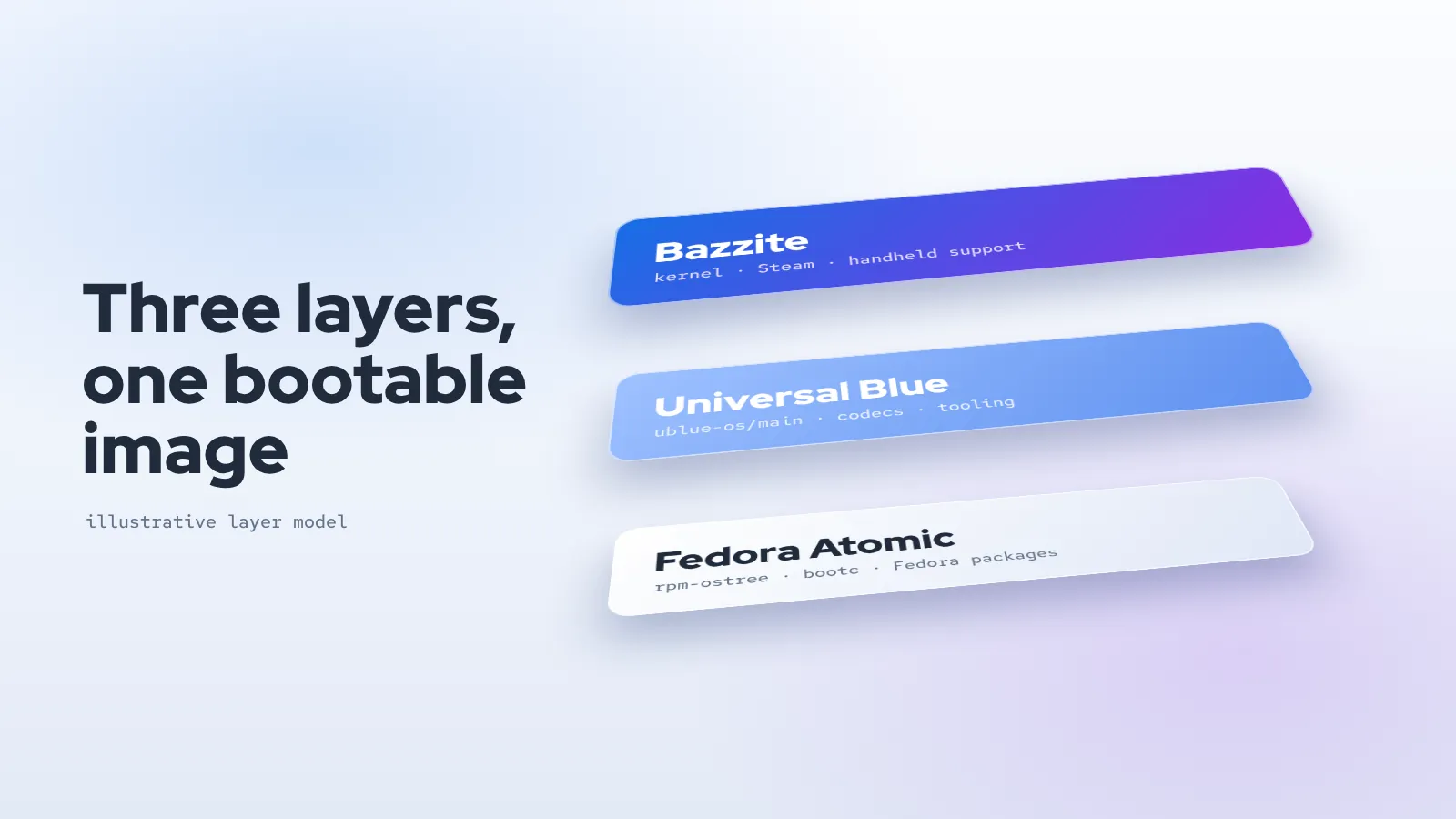
The three layers in one picture
It helps to think of Bazzite as a stack of three layers, each produced by a different team, each with a clear job.
| Layer | Who maintains it | What it contributes |
|---|---|---|
| Fedora Atomic Desktops | The Fedora Project | Packages, the Linux kernel base, systemd, SELinux, KDE Plasma and GNOME builds, and rpm-ostree / bootc image technology |
| Universal Blue main images | The Universal Blue community | Multimedia codecs, extra hardware support, signing, shared tooling such as ujust, and the build pipeline |
| Bazzite | The Bazzite team within Universal Blue | Gaming kernel, Steam and Game Mode, handheld input and power control, gaming utilities, Bazzite Portal and the variant images |
None of these layers is a fork in the old sense. Bazzite does not maintain its own copy of Fedora; it takes Fedora's current output, applies a repeatable recipe, and publishes the result as a new image. When Fedora moves to a new release, Bazzite moves with it after testing, which is why Bazzite version numbers track Fedora's: Bazzite 44 followed Fedora 44 in spring 2026, and Bazzite 45 followed Fedora 45 in November.
Layer one: Fedora Atomic Desktops
Fedora is one of the longest-running Linux distributions, sponsored by Red Hat and developed in the open by a large community. Most people know the traditional Fedora Workstation, where you install packages directly onto the running system with dnf. Fedora also produces a second family called Fedora Atomic Desktops, which includes Silverblue (GNOME) and Kinoite (KDE Plasma). These use the same packages as Workstation but deliver them in a fundamentally different way.
The image model
On an atomic system, the operating system is not a collection of packages you modify one by one. It is a single, versioned filesystem tree, assembled ahead of time and shipped as a unit. Your machine downloads that tree, stores it beside the one you are currently running, and switches to it on the next boot. The tool that manages this is rpm-ostree, and Fedora has been steadily adopting bootc, which treats the operating system as a bootable OCI container image, the same format used by Docker and Podman.
Three consequences follow from this design, and Bazzite inherits all of them:
- The system directories are read-only.
/usrcannot be changed by accident, by a misbehaving installer or by a script copied from a forum. Your personal files in/homeand configuration in/etcremain writable. - Updates are all-or-nothing. A new system tree is either fully staged or not staged at all. If the power fails during an update, you simply boot the version you already had.
- Every previous version is a reboot away. Because the old tree is kept, rolling back means choosing the previous entry at boot or running
rpm-ostree rollback.
Why Fedora rather than another base
Fedora sits in a useful middle ground for a gaming system. It ships new kernels, Mesa graphics drivers and desktop releases quickly, which matters for recent GPUs and handhelds, but every release goes through a structured testing cycle before it reaches users. Fedora also invested early in the atomic model, so the tooling Bazzite depends on is maintained upstream by people whose full-time job is keeping it working. Building on Fedora means Bazzite's developers can spend their time on gaming problems rather than on maintaining package infrastructure.
Layer two: Universal Blue
Fedora's own atomic images are deliberately conservative about what they include. For legal reasons they leave out some multimedia codecs, and they do not bundle proprietary drivers. Universal Blue was created to close that gap. It is a community project that takes Fedora's atomic images and produces "main" images with the missing pieces added, using a cloud-native build pipeline: a Containerfile describes the changes, continuous integration builds the image every day, and the result is signed and pushed to a container registry.
Bazzite is built on top of those Universal Blue main images, alongside sister projects such as Bluefin and Aurora, which target developer workstations rather than gaming. That shared foundation brings several practical benefits:
- Codecs out of the box. Hardware-accelerated video decoding, including H.264, works without hunting for extra repositories.
- Signed images. The images are signed so your system can verify that an update came from the project's build pipeline.
ujustcommands. A collection of convenience recipes, run asujust <task>, for jobs such as enrolling the Secure Boot key or installing optional tools.- A long rollback window. Universal Blue keeps recent builds available in its registry, so you can rebase to an image from weeks ago if a regression appears and is not fixed quickly.
The Universal Blue community also runs the support forum and much of the documentation infrastructure that Bazzite users rely on, which is why you will see both names together in release announcements.
Layer three: what Bazzite itself adds
Everything above is general-purpose. Bazzite's own contribution is the part that turns an atomic Fedora desktop into a game machine. The project's own README describes it as a custom image built for gaming and everyday use on desktops, handhelds and home-theatre PCs, and the additions fall into a few groups.
Kernel and drivers
Bazzite ships its own kernel build, referred to in release notes as the OGC kernel, carrying patches aimed at gaming hardware and handheld devices. Bazzite 44 brought a 6.19-series kernel with Valve's VRAM management patches, and later 2026 updates moved to the 7.x series. On top of the kernel, Bazzite includes current Mesa graphics drivers, the xone driver for Xbox wireless adapters, DisplayLink support, and drivers for peripherals such as Razer devices and drawing tablets. NVIDIA users get dedicated images with NVIDIA's drivers built in rather than added after installation.
Steam and Game Mode
Steam is preinstalled on every image. The deck variants go further and boot directly into Steam Game Mode running on gamescope, Valve's micro-compositor, so a handheld or TV-connected PC behaves much like a Steam Deck from power-on. This is the piece that most often leads people to say Bazzite is "based on SteamOS". It is not; it uses the same open components Valve uses for that interface, on top of a Fedora base.
Handheld input and power
Handheld PCs need things desktops do not: mapping built-in controls to a virtual controller, a quick-access overlay, battery-aware power limits and fan control. Bazzite integrates these, and during 2026 it moved handheld input handling to InputPlumber. Model-specific support keeps arriving; the Bazzite 45 notes, for example, list initial support for the Acer Predator Atlas 8 and stable support for the newer ROG Ally hardware.
Gaming tools and Bazzite Portal
The images include MangoHud for performance overlays, vkBasalt for post-processing, OBS VkCapture for game capture, Input Remapper, Lutris, Distrobox and Waydroid for Android apps. App installation runs through Flatpak, with Bazaar as the default storefront. Bazzite Portal ties the system together: it is a graphical front end to ujust recipes, with sections for installing applications, managing Bazzite, tweaking the system and troubleshooting, including update, rollback, rebase and reset actions.
How a Bazzite image is actually built
Knowing the build process removes most of the mystery. The Bazzite repository on GitHub contains a Containerfile and a set of build scripts. Continuous integration runs them on a schedule:
- Start from the relevant Universal Blue main image for the current Fedora release.
- Swap in the Bazzite kernel and add drivers, firmware and system packages.
- Add Steam, gamescope, the handheld stack and the bundled tools.
- Apply configuration, services and
ujustrecipes. - Produce each variant: desktop and deck, KDE and GNOME, with and without NVIDIA drivers.
- Sign the images and publish them to the GitHub Container Registry.
Your installed system then follows one of these published images. When you update, rpm-ostree or bootc pulls the newer build of the same image and stages it. Because the entire stack is built and tested together, a kernel update and the matching NVIDIA driver arrive at the same moment rather than drifting apart, which is a common cause of broken boots on traditional distributions.
The source ZIP linked from our homepage contains exactly these recipes. It is useful if you want to study the build or create a custom image derived from Bazzite, but it is not an installer. Regular users install from the ISO images on the official site.
What Bazzite is not based on
Clearing up the common misconceptions saves confusion when you search for help.
Not SteamOS
SteamOS 3 is Valve's operating system for the Steam Deck and is based on Arch Linux. Bazzite shares the Game Mode experience because both use Steam's interface and gamescope, but the underlying distribution, package format, update mechanism and maintainers are different. Our Bazzite vs SteamOS comparison covers the practical differences.
Not Arch or Ubuntu
Bazzite does not use pacman or apt on the host. Guides that tell you to run those commands are written for other distributions. If you need an Arch or Ubuntu environment, Distrobox can create one in a container that shares your home folder, which is the supported way to use those package managers on Bazzite.
Not traditional Fedora Workstation
Even many Fedora instructions do not apply directly. sudo dnf install is not how you add software to Bazzite. Applications come from Flatpak, command-line tools from Homebrew, and only rarely should you layer an RPM onto the image with rpm-ostree install, because every layered package has to be reapplied on each update and can block upgrades if it conflicts.
What the Fedora base means in daily use
The architecture is only interesting because of how it changes the experience of owning the machine. Here is what you will notice.
- Updates feel like a phone or console. The system downloads quietly in the background and the change takes effect after a restart. There is no long list of individual package upgrades to watch.
- Recovery is simple. If a new build breaks something you depend on, select the previous deployment in the boot menu, then pin it until a fix arrives.
- You can switch variants without reinstalling. Moving from KDE to GNOME, or from the desktop image to the deck image, is a rebase to a different image name rather than a fresh install. Your home folder stays as it is.
- Fedora documentation still helps. Questions about SELinux, firewalld, systemd or networking are answered by Fedora's material, because those parts are unchanged.
- New hardware lands quickly. Fedora's fast kernel and Mesa cadence, plus Bazzite's own kernel patches, mean recent GPUs and handhelds are usually supported sooner than on long-term-support distributions.
There are trade-offs. Software that expects to write into system directories needs a container or a different packaging approach. Kernel modules from outside the image, such as some proprietary drivers, cannot simply be compiled onto the running system. And if you enjoy hand-tuning every package on your machine, an immutable base will feel restrictive. For most players, though, those limits are the price of a system that does not quietly degrade over time.
How Bazzite releases follow Fedora
Fedora publishes a new release roughly every six months, in spring and autumn. Bazzite does not switch on the same day. The team rebuilds every variant on the new base, tests it, and typically promotes desktop images first, because handheld images carry more device-specific work. In 2026 this was visible in both cycles: Bazzite 44 shipped for desktops in late April while deck images stayed in testing for a while longer, and Bazzite 45 reached stable on 3 November 2026, a few days after Fedora 45.
Between major versions, stable builds are published frequently, carrying kernel, Mesa, Steam-related and handheld fixes. Image tags include the Fedora version and a date, such as 45.20261105, which makes it easy to see which build you are on with rpm-ostree status.
Summary
Bazzite is Fedora Atomic underneath, Universal Blue in the middle and a dedicated gaming layer on top. Fedora provides the packages and the atomic image technology that make updates safe and reversible. Universal Blue adds codecs, signing, shared tools and the build pipeline. Bazzite adds the kernel, drivers, Steam and Game Mode, handheld support and the utilities that make a PC feel ready to play from the first boot. Understanding that stack tells you where to look for help, which commands apply, and why the system is built to be swapped as a whole rather than patched piece by piece.
Ready to try it? Use the image finder on our homepage to identify the right variant, then follow the Bazzite install guide.
Frequently asked questions
Is Bazzite just Fedora with Steam installed?
No. It uses Fedora's atomic base, but adds a different kernel, extra drivers, handheld input and power management, Game Mode sessions, bundled tools and its own update and configuration tooling. Reproducing it by hand on Fedora would take considerable effort and would not give you the same tested, image-based updates.
Can I use Fedora repositories on Bazzite?
You can layer RPM packages with rpm-ostree install, but it should be a last resort. Flatpak, Homebrew and Distrobox cover nearly every need without slowing down or blocking updates.
Which Fedora version is Bazzite on right now?
As of November 2026, stable Bazzite is on the 45 series, built on Fedora Linux 45. Run rpm-ostree status on your machine to see the exact image and date you are running.
Does being based on Fedora make Bazzite less suitable for gaming than SteamOS?
Not inherently. Gaming performance depends mostly on the kernel, Mesa or NVIDIA drivers, Proton and gamescope, all of which Bazzite ships in current versions. The bigger differences are hardware coverage and the desktop experience, which the comparison guide explains.